Writing 7 min read
A 2012 Surface RT, reborn as a hallway thermometer
Getting Linux onto a locked-down Windows RT tablet so it could show the heating on the wall. One bad USB stick, one wiped Windows install, one kernel bug reported upstream, and an AI doing most of the typing.
I have had a first-generation Surface RT in a drawer for years. Tegra 3, 2 GB of RAM, a decent 1366×768 screen and a kickstand, which is most of what you want from a wall panel. The plan was simple: hang it in the hallway and have it show the heating and the room temperatures from Home Assistant.
The plan stops working as soon as you turn it on. Windows RT ships Internet Explorer 11, which cannot render Home Assistant's frontend at all, and it only runs Microsoft-signed software. So the only way to make the tablet useful was to get Linux on it, and that means getting past Secure Boot on a device whose firmware Microsoft never intended anyone to touch.
I did this over about a week, most of it one long Saturday, with Claude Code running in a terminal on my Mac. I want to be upfront about that, because it shaped how the whole thing went. It did the reading, prepared the USB sticks, wrote the scripts and, once Linux was up, did nearly everything over SSH. I pressed the physical buttons, made the irreversible calls, and occasionally told it it was wrong.
Secure Boot, and the stick that lied
The community route is the Open Surface RT project's Tegra Jailbreak USB. Two exploits run from a USB stick: Golden Keys (originally GoldenKeysUSB) installs a leaked Microsoft debug policy that lets the boot manager load unsigned code, and Yahallo uses a Tegra TrustZone bug to turn Secure Boot off permanently. You boot the stick twice and pick an entry from a menu each time.
The menu wants a USB keyboard. The Surface RT has one USB port, and the stick is in it. The docs say you need a hub.
You don't, as it turns out. Instead of trusting the docs, Claude read the toolkit's boot configuration and the policy installer's own UI strings. The menu boots its default entry after 30 seconds, and the accept screen takes Volume Up/Down and the Windows button. So the "keyboard" became a 76-byte edit to the BCD file on the Mac: point the default entry at whichever exploit runs next, eject, boot, wait.
The first attempt failed with File: \BCD, 0xc0000034, i.e. file not found.
That was the USB stick. It had passed a checksum straight after writing, and
had then quietly stored thousands of bytes of garbage. The check had read the
files back out of the Mac's page cache rather than off the flash. From then on
every stick was verified after unplugging and re-plugging it. That is the kind of
lesson you only need to learn once.
Windows updates won't let you in
With a good stick, Golden Keys installed without complaint. Yahallo then hit a signature error. Microsoft's late-2016 security updates, MS16-100 and MS16-140, quietly neuter Golden Keys: the policy installs but is never honoured. Mine had every update going.
The fix the toolkit recommends is the blunt one: wipe the internal storage. That
also made BitLocker irrelevant. Windows RT
encrypts itself
the first time you sign in with a Microsoft account, and a blank disk has nothing
left to decrypt, so there was no need to chase the recovery key. So: boot
Microsoft's own recovery image
from USB, tap Skip this drive at the BitLocker prompt, open a command prompt,
and run diskpart, select disk 0 and clean. Claude was firm about one thing
here. I had to read back the list disk output and confirm the 29 GB disk was
the internal one before typing clean. Fair. The same image will put Windows RT
back if I ever want it.
On a blank disk, Golden Keys and then Yahallo went through, and the screen said Secure Boot disabled.
Linux, without a keyboard
Open Surface RT publishes a ready-made Raspberry Pi OS image with their kernel, and it booted first time from USB. Then it asked me to create a user, with no on-screen keyboard.
Rather than buy a hub, we set it up from the Mac. The FAT boot partition takes a
userconf.txt (username and password hash) and an empty ssh file, which the
stock services pick up at boot. The Wi-Fi profile has to go into the ext4 root
filesystem, which macOS can't write, so Claude dry-ran a set of debugfs writes
against a copy of the image, checked the result with e2fsck, and then handed me
one sudo command to apply them to the stick. The Wi-Fi password came straight
out of the macOS Keychain into the profile without ever being printed. The next
boot came up on the desktop and on the network. One small catch: the interface
is called mlan0, not wlan0. That was worth knowing before pinning a config
to the wrong name.
That was the real test of the project. The stock Home Assistant dashboard took about thirty seconds to first load and was then perfectly usable. The UEFI boot path leaves the Tegra running with its L2 cache off and no frequency scaling, and I had half expected it to be unbearable. It isn't.
A kernel bug, reported upstream
Copying the system onto the internal storage went wrong in an interesting way.
sfdisk wrote the new partition table, the kernel hit a WARN in
blkdev_get_by_dev(), then oopsed, and fourteen minutes later the Wi-Fi firmware
died too.
The kernel (source) is a
linux-next snapshot from June 2023. Claude went and read the block layer at
that exact tag. sfdisk opens the disk exclusively, and the partition re-read
passed that exclusive mode on with no holder, which trips a sanity check. It was
a known regression,
caught by syzbot
within days and fixed by two commits,
985958b8584c
and 56e71bdf324d,
that landed in 6.5. The Surface RT kernel was frozen just before them. The
workaround was trivial: partition with --no-reread, then reboot. I
reported it with the
upstream fixes attached, and said plainly that the oops that followed the
warning is still unexplained.
That report also got a correction a few hours later. It had said unplugging the charger reliably hangs the Wi-Fi. When we tested that properly, twice more, it didn't. Better to retract it in public than leave a false lead for someone else.
The panel
I didn't want Home Assistant's own dashboard on the wall. It works, but almost all of its cost on this hardware is the frontend itself. So the hallway panel is a single static page that talks to Home Assistant's WebSocket API directly. It has no framework and no animation, and it does nothing that needs a GPU, because there isn't one. The only dependency is the Inter typeface, bundled locally. It boots straight into Chromium in kiosk mode, with no desktop behind it.
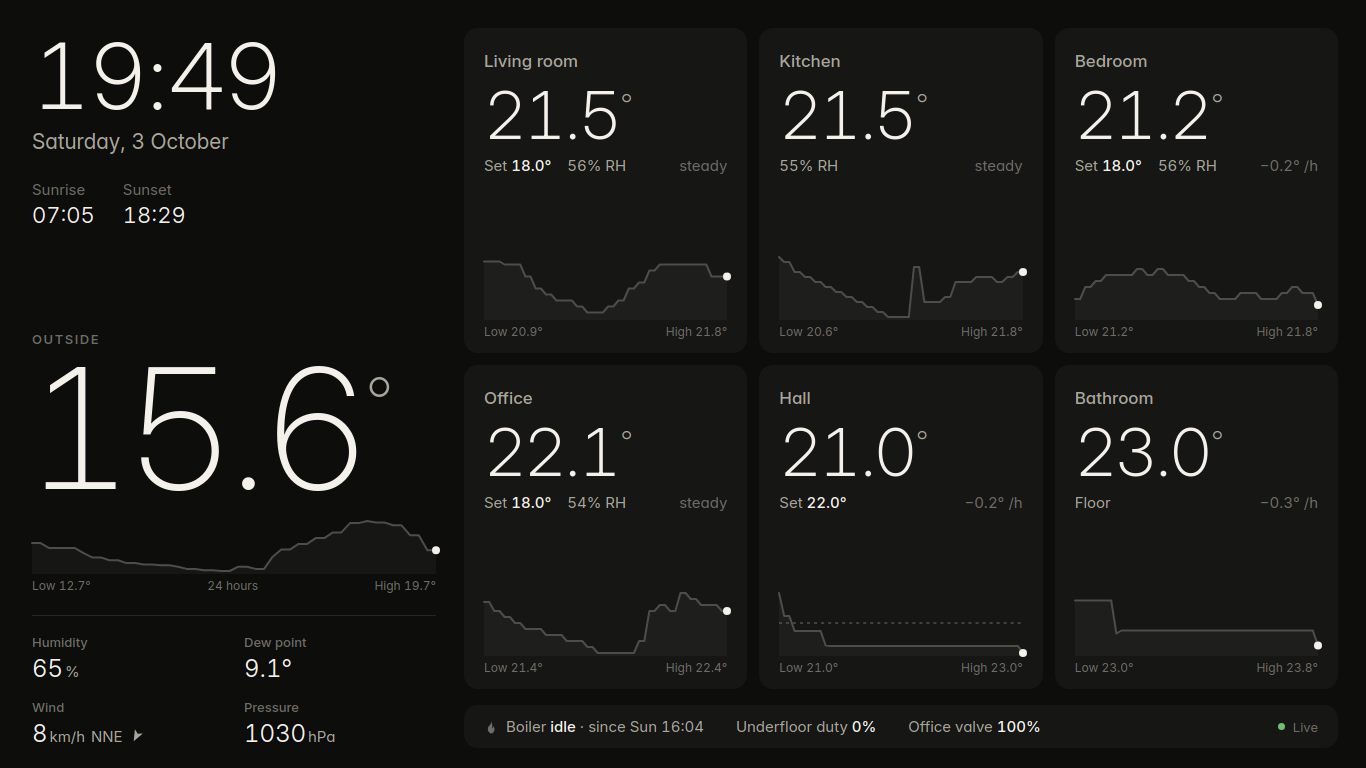
It dims to about 6% at nine in the evening and comes back up at half six. A small watchdog reboots the tablet if the Wi-Fi firmware ever hangs. The chip has no software reset line on this board, and the driver's own recovery deadlocks, so a reboot is the only lever there is. Measured on battery, the whole thing draws about 5 W, which is roughly £14 a year at the wall.
On doing it this way
The parts of this I would not have done well alone are the reading. The
moments that mattered were all cases of going to the source instead of the
summary: the jailbreak menu's real boot configuration, the macOS backend in the
Tegra 3 fork of fusee-launcher
(which ruled out an entire blocker I had been planning around), the block layer
at a specific linux-next tag, the device tree for the Wi-Fi chip. None of that
is hard. It is just slow, and it is exactly the kind of thing I'd skip at eleven
at night and regret.
It was not flawless. Partway through, a pkill -f chromium matched its own SSH
command line and killed the session that was meant to start the eMMC copy. It
later misread an uptime and told me the tablet had rebooted on its own, which it
hadn't. Both times it said so plainly and corrected course, and the mistakes were
cheap ones. The decisions that weren't cheap stayed with me: wiping
Windows, erasing a stick with old files on it, posting publicly under my name.
It asked every time, and I'd want it to.
The Surface is on the wall now. It is a far better use of the thing than the drawer was.
Links
- Open Surface RT: the project, and the documentation to trust
- Tegra Jailbreak USB and Yahallo
- GoldenKeysUSB, the original USB tool
- Surface recovery image: needs the serial number under the kickstand
- Prebuilt Surface RT images and kernels; kernel source
- The
BLKRRPARTregression: syzbot report, fixes985958b8584cand56e71bdf324d, and my report - Home Assistant WebSocket API
- Claude Code